Image Encoders
Flemme supports various image encoders using convolution, transformer and SSM as backbones. All encoders and decoders follow a pipeline illustrated in following figure:
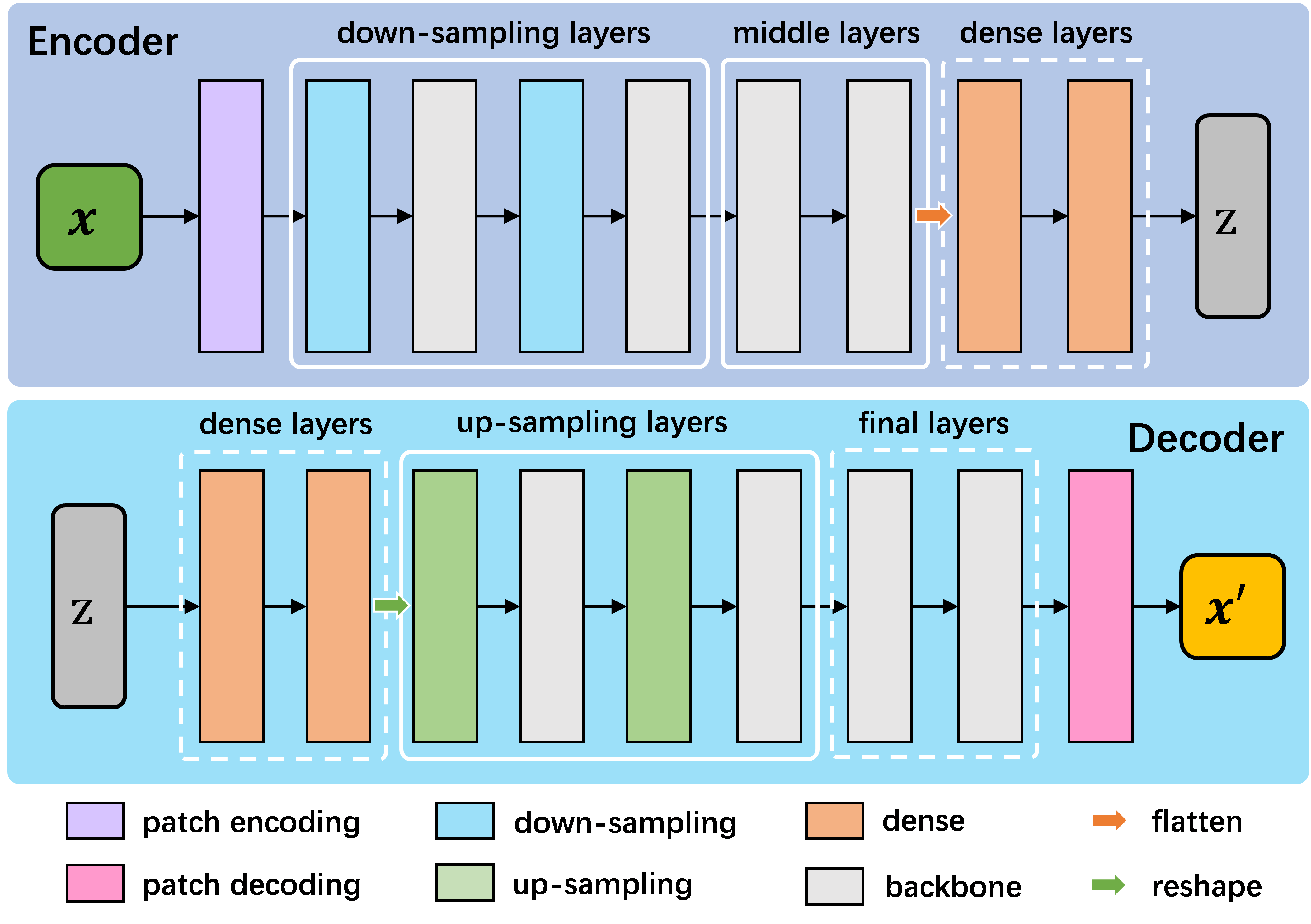
We will elaborate supported encoders in the remainder of this article.
CNN
CNN indicates the encoders using convolution as backbones. To initialize a CNN encoder, you need to specify the following parameters:
 1CNNEncoder.__init__(self, image_size,
 2                ## number of input channels
 3                image_channel = 3,
 4                ## number of input time channels (context embedding t)
 5                time_channel = 0,
 6                ## number of image patch channels
 7                patch_channel = 32,
 8                ## size of image patch
 9                patch_size = 2,
10                ## number of channel for each down-sample layer
11                ## The length of list is the number of down-sample layers
12                down_channels = [64, 128],
13                ## attention of each down-sample layers following convolution, should be one of [None, 'atten', 'ftt_atten']
14                ## defaut value is None
15                ## the length of this list should be equal to len(down_channels)
16                down_attens = [None, None],
17                ## shape scaling for each layer, after down-sampling the image shape becomes [H, W, D] / shape_scaling
18                shape_scaling = [2, 2],
19                ## number of channel for each middle layer
20                ## The length of list is the number of middle layers
21                middle_channels = [256, 256],
22                ## attention of each middle layers,
23                middle_attens = [None, None],
24                ## define the convolution: depth-wise and kernel size
25                depthwise = False, kernel_size = 3,
26                ## number of channels for each dense layer (fully-connected layer)
27                ## dense_channels can be an empty list, indicating there is no dense layer in the encoder
28                dense_channels = [256],
29                ## method fur dowm-samping, can be one of ['conv', 'inter'], indicate using convolution and interpolation
30                dsample_function = 'conv',
31                ## building block, can be one of ['conv', 'double_conv', 'res_conv']
32                building_block='conv',
33                ## normalization, can be one of ['batch', 'group', 'instance', 'layer']
34                normalization = 'group', num_norm_groups = 8,
35                ## order of convolution and normalization in building block
36                cn_order = 'cn',
37                ## number of building blocks in each layer
38                num_blocks = 2,
39                ## activation for building blocks
40                activation = 'relu',
41                ## parameters related to attentions following convolution
42                dropout = 0.1, num_heads = 1, d_k = None, qkv_bias = True, qk_scale = None, atten_dropout = None,
43                ## add position embedding for constructed image patch
44                abs_pos_embedding = False,
45                ## If last_activation is set as True, we will perform normalization and activation in the last layer of encoder.
46                last_activation = True,
47                ## some parameters determined by architectures.
48                return_features = False, z_count = 1,
49                **kwargs)
CNNDecoder has very similar parameters for initialization.
 1CNNDecoder.__init__(self,
 2                ## same as the encoder
 3                image_size,
 4                ## number of output channels.
 5                ## if not specified, it is set to the image channel of the encoder.
 6                image_channel = 3,
 7                ## number of latent channels (z, the output of encoder)
 8                ## derived from encoder
 9                in_channel = 256,
10                ## you can specify the following parameters, but we recommend to use the default choices
11                ## by default, we reverse the correspondings in encoder
12                dense_channels = [32],
13                up_channels = [128, 64],
14                up_attens = [None, None],
15                shape_scaling = [2, 2],
16                ## you can specify these optional parameters
17                ## but using default values is also a good choice
18                final_channels = [],
19                final_attens = [],
20                usample_function = 'conv',
21                ## same as the encoder
22                patch_size = 2,
23                time_channel = 0,
24                depthwise = False,
25                kernel_size = 3,
26                building_block='single',
27                normalization = 'group',
28                num_norm_groups = 8,
29                cn_order = 'cn',
30                num_blocks = 2,
31                activation = 'relu',
32                dropout=0.1, num_heads = 1, d_k = None, qkv_bias = True, qk_scale = None, atten_dropout = None,
33                ## parameter determined by architectures.
34                return_features = False,
35                **kwargs)
The aboved parameters can be defined in the configuration file, in which the in_channel and out_channel refer to the image_channel of encoder and decoder, respectively. decoder_fc_channel refers to fc_channel of decoder.
As we discussed before, you don’t need to define all parameters for encoder and decoder in the configuration file. Also, parameters of decoder can be directly derived from encoder, so usually it is not necessary to define a decoder in configuration file.
Although we support to specify some parameters of decoder for more flexible usage. An example configuration file is presented as the follows:
 1encoder:
 2    name: CNN
 3    in_channel: 1
 4    out_channel: 1
 5    ## the value can be list or int
 6    image_size: 32
 7    patch_size: 1
 8    patch_channel: 32
 9    ### up-sampling function
10    usample_function: conv
11    ### down-sampling function
12    dsample_function: conv
13    ## down channels, indicating an up_channels: [32, 16]
14    down_channels: [16, 32]
15    ## attentions for down-sampling layers
16    ## if the value is not a list, it will be transfered to a list with a same length of down-sampling layers: None -> [None, None]
17    down_attens: null
18    ## attentions for up-sampling layers
19    up_attens: [null, atten]
20    middle_channels: [32, 32]
21    # up_channels: [16, 8]
22    building_block: conv
23    dense_channels: [128]
24    decoder_dense_channels: [128, 64]
Supported building_block for CNN encoder and decoder: [conv, res_conv, double_conv].
ViT
ViT indicates the encoders using vision transformer as backbones. To initialize a ViT encoder and decoder, you need to specify the following parameters:
 1ViTEncoder.__init__(self,
 2                # similar parameters with CNN encoder
 3                image_size,
 4                image_channel = 3,
 5                patch_size = 2,
 6                patch_channel = 32,
 7                building_block = 'vit',
 8                dense_channels = [256],
 9                time_channel = 0,
10                down_channels = [128, 256],
11                ## number of heads for MSA in each down-sample layer, defaut value is 3
12                ## The length of list is the number of down-sample layers
13                down_num_heads = [3, 3],
14                ## number of heads for MSA in each middle layer
15                middle_channels = [256, 256],
16                middle_num_heads = [3, 3],
17                normalization = 'layer', num_norm_groups = 8,
18                num_blocks = 2,
19                activation = 'silu',
20                abs_pos_embedding = False,
21                return_features = False,
22                z_count = 1,
23                # parameters related to multi-head self attention and vit building block
24                ## define the length of MLP layers and channels, channel = ratio * block_in_channel
25                mlp_hidden_ratio=[4., ],
26                qkv_bias=True, qk_scale=None,
27                ## dropout information
28                dropout=0.,
29                atten_dropout=0.,
30                drop_path=0.1,
31                last_activation = True,
32                **kwargs)
Supported building_block for ViT encoder and decoder: [vit].
Swin
Swin indicates the encoders using Swin transformer as backbones, which is a vision transformer using shifted window and relative position embedding. Swin encoder and decoder inherit from ViT. To initialize a Swin encoder and decoder, you need to specify the following parameters:
 1SwinEncoder.__init__(self,
 2                image_size,
 3                image_channel = 3,
 4                # size of window, can be a list whose length is equal to the dimension of image, or a integer.
 5                window_size = 8,
 6                time_channel = 0,
 7                patch_size = 2,
 8                patch_channel = 32,
 9                building_block = 'swin',
10                dense_channels = [256],
11                mlp_hidden_ratio=[4., ],
12                qkv_bias=True, qk_scale=None,
13                down_channels = [128, 256],
14                middle_channels = [256, 256],
15                down_num_heads = [3, 3],
16                middle_num_heads = [3, 3],
17                dropout=0.,
18                atten_dropout=0.,
19                drop_path=0.1,
20                normalization = 'layer',
21                num_norm_groups = 8,
22                num_blocks = 2,
23                activation = 'silu',
24                abs_pos_embedding = False,
25                return_features = False,
26                z_count = 1,
27                last_activation = True,
28                **kwargs)
As you can see, the only different between defining a ViT encoder and Swin encoder is that you need to specify the window_size.
Supported building_block for Swin encoder and decoder: [swin, double_swin, res_swin].
VMamba
VMamba indicates the encoders using vision mamba as backbones. To initialize a VMamba encoder and decoder, you need to specify the following parameters:
 1VMambaEncoder.__init__(self,
 2                # same as ViT
 3                image_size,
 4                image_channel = 3,
 5                patch_size = 2,
 6                patch_channel = 32,
 7                time_channel = 0,
 8                down_channels = [128, 256],
 9                middle_channels = [256, 256],
10                mlp_hidden_ratio=[4., ],
11                building_block = 'vmamba',
12                dense_channels = [256],
13                dropout=0.,
14                drop_path=0.1,
15                normalization = 'layer',
16                num_norm_groups = 8,
17                num_blocks = 2,
18                activation = 'silu',
19                abs_pos_embedding = False,
20                return_features = False,
21                z_count = 1,
22                # parameters related to Mamba SSM
23                # details of these parameter can refer to the source code
24                # default values give satisfactory results
25                state_channel=None,
26                conv_kernel_size=3,
27                inner_factor = 2.0,
28                dt_min=0.001, dt_max=0.1,
29                dt_init_floor=1e-4,
30                conv_bias=True,
31                bias=False,
32                ## cross-scan module, should be one of [single, simplified, cross]
33                ## the corresponding times of scanning are 1, 2, 2 and 1, 2, 6 for 2D and 3D image patches, respectively.
34                scan_mode = 'single',
35                ## Flip the scanning, double the scanning times
36                flip_scan = True,
37                head_channel = 64,
38                chunk_size=256,
39                last_activation = True,
40                **kwargs)
Supported building_block for Swin encoder and decoder: [vmamba, vmamba2, double_vmamba, double_vmamba2, res_vmamba, res_vmamba2].
U-Shaped Encoders
The corresponding U-shaped variants for CNN, ViT, Swin and VMamba encoders are UNet, ViTU, SwinU and VMambaU. Empirically, U-shaped networks don’t contain dense layers.
You can directly replace the encoder name with the corresponding U-shaped version to train a U-shaped network.
To summarize, we support the following image encoders:
Encoder |
Backbones |
Building Blocks |
|---|---|---|
CNN, UNet |
convolution |
conv, res_conv, double_conv |
ViT, ViTU |
vision transformer |
vit |
Swin, SwinU |
vision transformer |
swin, double_swin, res_swin |
VMamba, VMambaU |
vision ssm (mamba) |
vmamba, vmamba2, double_vmamba, double_vmamba2, res_vmamba, res_vmamba2 |